Model criticism is essential: all models are wrong, but some are useful (Gelman et al. 2013). This chapter develops diagnostics for what is wrong with a fitted model and whether it remains useful for the question at hand. That is part of Seeing in the Observable stratum: validating inferences drawn from actualised data.
26.2 Why Model Criticism?
Models are approximations. Model criticism helps us:
Find failures: Where does the model break?
Assess usefulness: Is the model good enough for the question?
Guide improvement: What should we fix?
Build trust: Can we trust the model’s predictions?
26.3 Calibration
26.3.1 What Is Calibration?
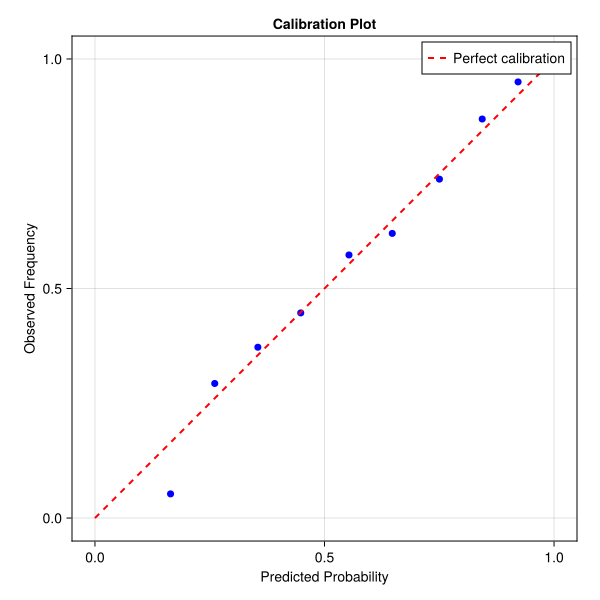
A model is calibrated if predicted probabilities match observed frequencies (Gelman et al. 2013).
Example: If the model predicts 80% probability of an event, the event should occur ~80% of the time.
26.3.2 How to Check
Calibration plots: Predicted vs observed probabilities (Gelman et al. 2013)
Reliability diagrams: Binned predictions vs observed frequencies
Figure 26.1: Calibration plot: predicted vs observed probabilities
26.4 Posterior Predictive Checks (PPCs)
26.4.1 The Idea
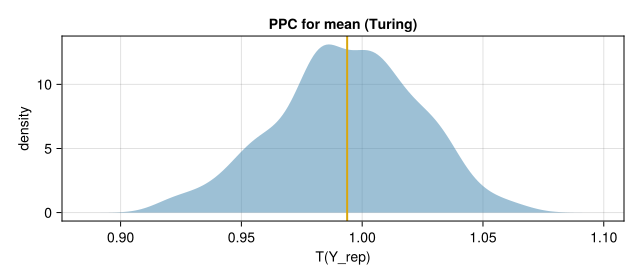
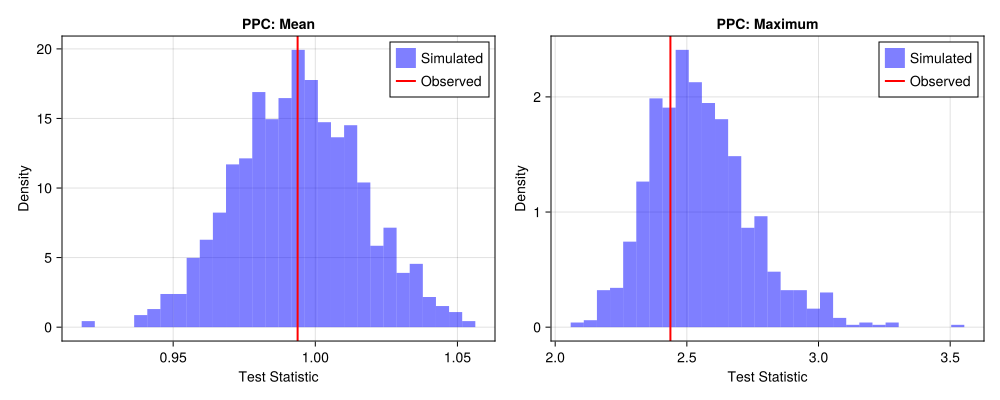
Compare observed data to data simulated from the fitted model (Gelman et al. 2013; Gabry et al. 2019): \[
Y^{\text{rep}} \sim P(Y \mid \theta_{\text{posterior}})
\]
If \(Y^{\text{rep}}\) looks like \(Y^{\text{obs}}\), the model captures the data.
26.4.2 Test Statistics
Choose test statistics \(T(Y)\) that capture important features:
Means, variances: First and second moments
Autocorrelations: Temporal structure
Extrema: Rare events
Domain-specific: Scientific quantities of interest
26.4.3 Interpretation
\(p\)-values: Extreme values (near 0 or 1) indicate problems
Visual comparison: Do simulated data look like observed data?
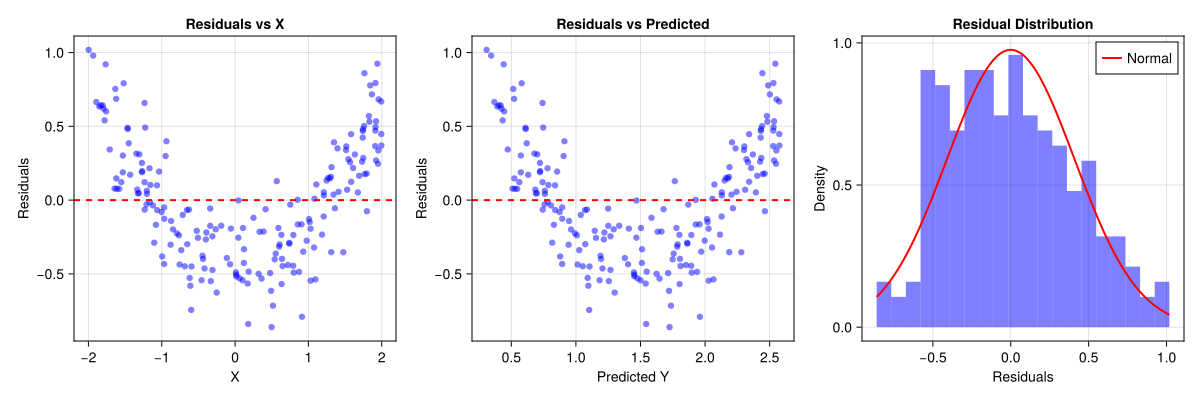
We can check residuals for structure that indicates model problems:
# Find project root and include ensure_packages.jlproject_root =let current =pwd()while !isfile(joinpath(current, "Project.toml")) && !isfile(joinpath(current, "_quarto.yml")) parent =dirname(current) parent == current &&break current = parentend currentendinclude(joinpath(project_root, "scripts", "ensure_packages.jl"))@auto_usingRandom Distributions GLM DataFrames CairoMakieRandom.seed!(42)# Simulate data with missing quadratic term (model misspecification)n =200X =rand(Uniform(-2, 2), n)Y =1.0.+0.5.* X .+0.3.* X.^2.+rand(Normal(0, 0.2), n) # True model has X²df =DataFrame(X = X, Y = Y)# Fit misspecified model (missing X² term)model =lm(@formula(Y ~ X), df)Y_pred =predict(model, df)residuals = Y .- Y_pred# Check residualsresidual_mean =mean(residuals)residual_std =std(residuals)# Check autocorrelation (for time series, here we check against X)# In time series, check lag-1 autocorrelation# Here, we check correlation with X to detect missing termsresidual_X_corr =cor(residuals, X)println("Residual analysis:")println(" Mean: ", round(residual_mean, digits=4), " (should be ≈ 0)")println(" Std: ", round(residual_std, digits=4))println(" Correlation with X: ", round(residual_X_corr, digits=4), " (should be ≈ 0)")println("\nInterpretation:")ifabs(residual_X_corr) >0.1println(" ⚠️ Residuals correlated with X → missing term (e.g., X²)")elseprintln(" ✓ Residuals appear independent of X")end
Residual analysis:
  Mean: -0.0 (should be ≈ 0)
  Std: 0.4089
  Correlation with X: -0.0 (should be ≈ 0)

Interpretation:
  ✓ Residuals appear independent of X
Figure 26.4: Residual analysis: checking for structure in residuals
26.6 Out-of-Domain Validation
26.6.1 The Problem
Models often fail when applied to new domains:
Different time periods: Temporal generalisation
Different populations: Population generalisation
Different conditions: Condition generalisation
26.6.2 How to Validate
Temporal split: Train on past, validate on future
Population split: Train on one population, validate on another
Condition split: Train on one condition, validate on another
26.6.3 AgeSCM: calibration and out-of-domain checks
Case Study 3 validates age models on held-out countries (T, S, B, M), plus replica and experiment splits. Phase 4 of the AgeSCM repository reports:
Calibration: reliability of predicted vs observed age (mean OLS and Stage 1), pooled and per domain.
OOD MAE: bar charts of hold-out domain error for country LOSO.
Residuals: pooled residual structure for mean OLS on country split.
Figure 26.5: Pooled calibration (mean spectrum OLS, country LOSO).
Figure 26.6: Out-of-domain MAE by held-out country (mean OLS).
Figure 26.7: Residuals (mean OLS, country LOSO).
Interpretation: Models are not well calibrated to ±2 days across all domains; S is easiest, M (small n) volatile. Transport claims must pair these diagnostics with IPTW overlap tables (Ch 20, sec-agescm-tmle), not pooled accuracy alone.
26.7 Stratum context
This chapter addresses Seeing in the Observable stratum: validating what we’ve learned from actualised data. Model validation uses observable data to test whether inferred mechanisms are consistent with observations, bridging the Observable stratum (what we observe) with the Structural/Dynamical strata (what mechanisms exist).
26.8 Key Takeaways
Calibration: Predicted probabilities should match observed frequencies
Posterior predictive checks: Compare simulated to observed data
Residual analysis: Check for structure in residuals
Out-of-domain validation: Test generalisation to new domains
Model criticism is essential: Find what’s wrong before using the model
26.9 Further Reading
Gelman et al. (2013): Bayesian Data Analysis: Model criticism
Gabry et al. (2019): “Visualization in Bayesian workflow”
Vehtari et al. (2017): “Practical Bayesian model evaluation”
Gabry, Jonah, Daniel Simpson, Aki Vehtari, Michael Betancourt, and Andrew Gelman. 2019. “Visualization in Bayesian Workflow.”Journal of the Royal Statistical Society: Series A 182 (2): 389–402.
Gelman, Andrew, John B. Carlin, Hal S. Stern, David B. Dunson, Aki Vehtari, and Donald B. Rubin. 2013. Bayesian Data Analysis. 3rd ed. Chapman & Hall/CRC.
Vehtari, Aki, Andrew Gelman, and Jonah Gabry. 2017. “Practical Bayesian Model Evaluation Using Leave-One-Out Cross-Validation and WAIC.”Statistics and Computing 27 (5): 1413–32.